With PeerPanda for Microsoft Teams, it’s easy to push important competitor updates to a Teams channel.
Track your competitors directly from Teams
Our Microsoft Teams integration makes it easy to share competitor updates with your teammates:
- Share any update instantly: In PeerPanda, click “Share to Teams” on any competitor update to push it into your chosen Teams channel immediately.
- Rich Cards: Shared updates appear as formatted cards in Teams, so your team can scan the highlight and open the full activity in PeerPanda.
Install the Teams Integration
Just connect Microsoft from PeerPanda, pick a channel, and you’re good to go. Setup takes about a minute.
1. Install the integration
Go to your PeerPanda account’s Integrations section and click Microsoft Teams..
2. Authorize PeerPanda in Teams
Follow the authorization prompts. PeerPanda will request the necessary permissions to post updates and show link previews.
Attention! A lot of IT administrators prevent users from adding their own Microsoft Integrations.
If that's your case, you will be asked for a small message for your IT team, explaining why you'd like this integration enabled.
Just put us in contact with your IT team, and send them this page, and we'll sort things out for you!
3. Pick a Teams channel
We recommend creating a channel dedicated to #competitor or #industry-news, to share important updates with your colleagues.
That’s it. The next week, PeerPanda will post your first update. Any shared PeerPanda links will also expand automatically.

Select which channel should receive the weekly competitor updates. You can always change this later.
That’s it. The next week, PeerPanda will post your first update.
Push Competitor Updates to Teams
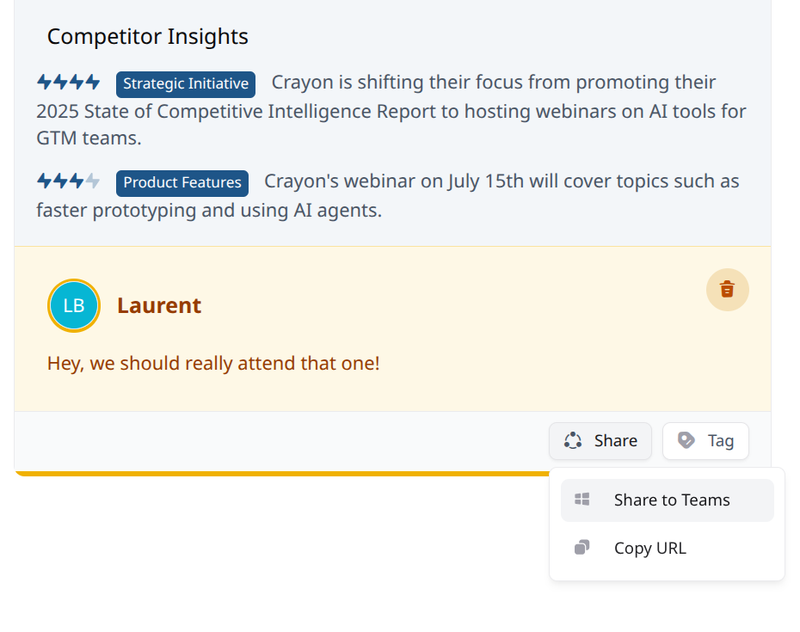
Click the Share to Teams button
In your Activity timeline, open the Competitor Update you're interested in, and then click Share to Teams
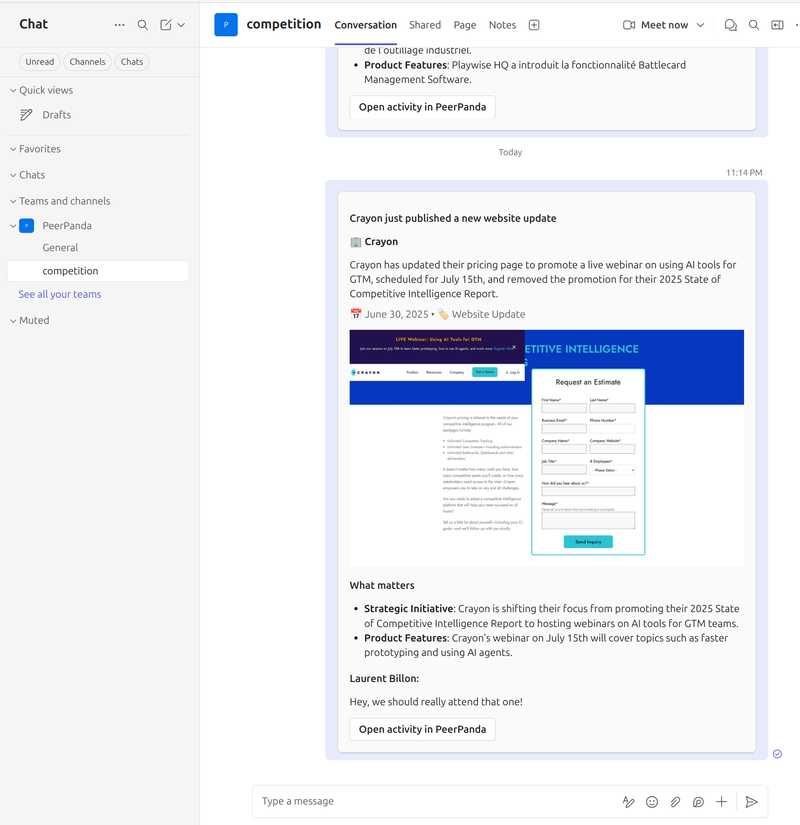
The Competitor Update is instantly shared to your chosen Teams channel